Table of Contents
A cluttered gaming desk isn’t just an eyesore—it’s a silent performance killer. In 2026, as gaming setups become increasingly sophisticated with multiple monitors, streaming equipment, VR headsets, and high-powered peripherals, cable chaos can quickly spiral from minor annoyance to major frustration. Tangled wires trap heat, collect dust, and make troubleshooting a nightmare when your stream crashes mid-raid or your controller disconnects during a clutch moment. Effective cable management transforms your battle station from a wire jungle into a clean, efficient command center where every component performs at its peak.
The evolution of gaming technology demands equally evolved organization solutions. Modern cable organizers do far more than simply bundle wires together—they’re engineered to preserve signal integrity, accommodate rapid hardware swaps, and even complement your RGB aesthetics. Whether you’re a competitive esports athlete requiring pristine signal paths or a content creator juggling cameras, microphones, and capture devices, understanding the latest cable management innovations will future-proof your setup for the next generation of gaming gear. Let’s explore how to choose and implement the perfect organization system for your specific gaming needs.
Top 10 Cable Organizers for Gamers
Detailed Product Reviews
1. Under Desk Cable Management Tray White, Cinati Wire Organizers No Drill, Cable Tray with Clamp for Wire Management, Cord Organization Box for Office, Home - No Damage to Desk

Overview: The Cinati Under Desk Cable Management Tray offers a damage-free solution for cord organization. This white metal tray clamps directly to desk frames between 0.4" and 2.4" thick, eliminating the need for permanent modifications. Measuring 13.4" x 4.6" x 3.1" and supporting up to 10 pounds, it provides ample space for power strips and cables while keeping them off the floor.
What Makes It Stand Out: The tool-free clamp installation sets this apart from screw-mounted alternatives. Anti-scratch mats protect desk surfaces, while the reversible design lets you mount the opening inward or outward based on your preference. The fully welded, powder-coated metal construction resists rust and dust accumulation better than plastic competitors.
Value for Money: At its price point, this kit includes not just the tray but also four cable clips and six cable ties—essentially a complete starter package. Compared to drilling into expensive desks or buying separate organizational components, it offers solid value while preserving your furniture’s integrity.
Strengths and Weaknesses: Strengths include easy installation, sturdy metal construction, and versatile mounting options. The included accessories add immediate utility. Weaknesses are the limited 10-pound capacity (insufficient for heavy power bricks) and the 2.4" maximum thickness restriction, which excludes many solid wood or executive desks. Clamp stability may vary on non-rectangular frames.
Bottom Line: Ideal for renters, glass desks, or anyone wanting a reversible solution. While not suited for heavy-duty power setups or very thick desks, it excels at basic cable management with minimal commitment. A practical choice for home offices prioritizing flexibility.
2. Mzmaxy Cable Management, 25’’ Cable Management Under Desk No Drill, Metal Cord Organizer with Clamp for Standing Desk, Cable Organizer for Home Office, Black

Overview: The Mzmaxy 25" Cable Management Tray targets standing desk users needing extensive cord organization. This black metal organizer clamps to desk edges 0.4" to 2" thick without drilling, supporting approximately 15 pounds across its generous length. The mesh design promotes ventilation while reducing dust buildup, making it suitable for power strips and bulky adapters.
What Makes It Stand Out: The extended 25-inch length accommodates standing desks’ vertical travel range, preventing cable strain during height adjustments. Built-in non-slip rubber pads protect surfaces, and the open-side design allows flexible cable routing. The mesh structure uniquely balances airflow with containment, addressing overheating concerns that solid trays miss.
Value for Money: For standing desk owners, this specialized length justifies the cost versus standard trays that might prove too short. The higher weight capacity and durable metal construction offer long-term reliability, though it’s pricier than basic plastic alternatives. You’re paying for purpose-built functionality.
Strengths and Weaknesses: Strengths include superior length for standing desks, excellent ventilation, sturdy 15-pound capacity, and scratch-free installation. The clamp system remains secure even with repeated desk movements. Weaknesses include the 2" thickness limitation (excludes some desks) and potential overkill for fixed-height workstations. The larger size may overwhelm smaller desk footprints.
Bottom Line: Perfect for standing desk setups where cable slack management is critical. The ventilation and length make it worth the premium for motorized desk users. Skip if you have a traditional fixed-height desk or exceptionally thick tabletop.
3. KDD Headphone Stand with Drawer - Headset & Controller Holder for Desk - Aluminum Supporting Bar Earphone Stand with Cable Organizer - Universal Gaming PC Accessories Storage

Overview: The KDD Headphone Stand with Drawer consolidates gaming accessories into one aluminum tower. This versatile organizer holds two controllers, one headset, and features a storage drawer for small items like chargers or pens. Integrated cable management keeps cords tidy, while silicone pads prevent device scratches. The design also accommodates smartphones, tablets, or Nintendo Switch in its grooves.
What Makes It Stand Out: Unlike basic stands, this all-in-one solution combines device storage with cable management and a functional drawer. The aluminum construction ensures stability without tipping, even when loaded with expensive controllers. The multi-device compatibility eliminates the need for separate stands cluttering your desk.
Value for Money: Purchasing individual controller holders, headphone stands, and desk organizers would cost significantly more. This unified solution saves both money and desk real estate. The premium aluminum build justifies the mid-range price point versus flimsy plastic alternatives that lack durability.
Strengths and Weaknesses: Strengths include exceptional versatility, sturdy aluminum build, protective silicone padding, and quick five-minute assembly. It declutters gaming setups effectively. Weaknesses include a larger desktop footprint than minimalist stands, and the drawer may feel shallow for substantial storage needs. The design aesthetic skews toward gamers, potentially clashing with professional office decor.
Bottom Line: An excellent choice for gamers seeking consolidated storage. It streamlines multiple accessories while maintaining a clean aesthetic. Not ideal for minimalists or those wanting wall-mounted solutions, but perfect for desk-based gaming command centers needing organization.
4. 8 Pack Cord Organizer Holder,Costop Strong Adhesive Desk Cable Management Magnetic Easy Open,Organize Phone Charging Cords Wire Holder Organizer Neatly for Home,Office,Car,Desk,Nightstand
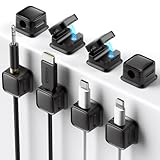
Overview: The Costop 8-Pack Cord Organizer set offers magnetic cable management for small-scale cord control. These adhesive holders feature magnetic locking mechanisms that secure charging heads while allowing easy cable extraction. Designed for cords up to 0.3" diameter, they work with charging cables, USB cords, and headphone wires. The pack provides eight units for multiple locations.
What Makes It Stand Out: The magnetic closure system distinguishes this from standard clip-style organizers. It automatically secures cables yet releases smoothly when pulled. The strong PET adhesive promises clean removal without residue, addressing a common frustration with permanent mounts. This reusable magnetic approach adds daily convenience.
Value for Money: Eight units at this price point offer excellent coverage for home, office, and car use. The magnetic feature and residue-free adhesive provide premium functionality typically found in costlier single units. For managing personal device cables rather than heavy power cords, the value proposition is strong.
Strengths and Weaknesses: Strengths include innovative magnetic locking, residue-free adhesive, versatile placement options, and the economical 8-pack quantity. Installation is straightforward on clean surfaces. Weaknesses include the 0.3" diameter limit (unsuitable for thick power cords), required 12-24 hour curing time for optimal adhesion, and potential magnetic weakness over time with heavy cables. Surface preparation is critical for longevity.
Bottom Line: Best for managing personal electronics cables in low-stress environments. The magnetic convenience shines for frequently-used charging cords. Avoid for heavy-duty power management or textured surfaces where adhesive may fail. A smart buy for tidying nightstands and desks.
5. No-Screw Under Desk Cable Management Tray - Self-Adhesive Installation, Cord Management, Cable Tray, Under Desk Wire Organizer - Black Set of 2

Overview: This No-Screw Under Desk Cable Management Tray set delivers adhesive-based cord concealment without tools or clamps. The two-pack black trays stick directly to desk surfaces using industrial-strength adhesive, accommodating multiple cables and power strips. Based on aggregated customer feedback, the design prioritizes aesthetics, ease of installation, and durability in a damage-free package.
What Makes It Stand Out: The pure adhesive installation eliminates both drilling and clamp mechanisms, making it uniquely suited for glass, metal, or delicate desks where clamps could cause stress points. The dual-tray configuration allows separation of power and data cables, reducing interference. Customer-driven design improvements reflect real-world usage patterns.
Value for Money: Two trays provide flexibility for complex setups at a price competitive with single-tray clamp systems. The included adhesive backing saves additional hardware costs. For renters or temporary installations, the non-destructive approach preserves security deposits, adding hidden value beyond the purchase price.
Strengths and Weaknesses: Strengths include truly tool-free installation, clean aesthetics, dual-tray versatility, and strong initial adhesion. The design effectively hides cables and power strips. Weaknesses include permanent placement (non-repositionable), potential adhesive failure over time or with heat exposure, and weight limits likely lower than metal clamp systems. Removal may still damage certain finishes despite “no-screw” claims.
Bottom Line: Ideal for renters, glass desks, or anyone seeking the simplest installation. The adhesive approach trades repositionability for convenience. Perfect for light to medium cable loads in climate-controlled environments. Choose clamp systems instead for heavy power bricks or if you anticipate reconfiguring your setup frequently.
6. KDD RGB Headphone & Controller Stand with 9 Light Modes - Foldable Controller Hanger for Desk - Earphone Stand with Cable Organizer - for Gamers Desktop Accessories

Overview: The KDD RGB Headphone & Controller Stand tackles gamer clutter with a sleek 3-in-1 design that stores one headset and two controllers simultaneously. Nine customizable lighting modes—from vibrant color cycling to static single-color options—transform functional storage into a visual centerpiece. The plug-and-play functionality works across Windows, Mac, and Linux without drivers, while integrated cable management keeps charging cords neatly routed. Assembly takes just 30 seconds, making it an instant upgrade to any gaming station.
What Makes It Stand Out: The memory function preserves your preferred lighting setting after power-down, eliminating constant reconfiguration. Foldable controller hooks retract when not in use, maintaining a minimal footprint. Unlike basic stands, this model incorporates cable organizers on both the hanger and base, plus a dedicated power button for safely disconnecting all electronics. The soft protective rubber on hooks prevents device scratches, while four anti-slip pads ensure stability.
Value for Money: Positioned in the mid-range for gaming accessories, this stand replaces three separate storage solutions at a comparable price. Single-function stands cost nearly as much without lighting or cable management, making this a cost-effective consolidation. The durable construction and thoughtful features justify the premium over basic plastic alternatives, delivering both utility and aesthetic appeal.
Strengths and Weaknesses: Strengths include sturdy anti-slip construction, versatile 3-in-1 storage, customizable RGB lighting with memory, and integrated cable management. The foldable hooks add flexibility for different setups. Weaknesses involve the plastic construction feeling less premium than metal alternatives, and the RGB lighting may not appeal to minimalists. The base footprint requires sufficient desk space.
Bottom Line: For gamers seeking organization with flair, this RGB stand is a compelling choice. It successfully merges practical storage with customizable aesthetics, though those preferring understated setups might find the lighting excessive.
7. Nettbe 60 PCS 6 Inches Reusable Cable Ties, Adjustable Cord Straps Wire Organizer Cord Wrap and Hook Loop Cable Management
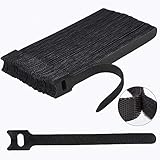
Overview: The Nettbe 60-Pack Reusable Cable Ties offers a straightforward solution to cable clutter using durable hook-and-loop technology. These 6-inch straps provide an eco-friendly alternative to single-use zip ties, crafted from premium nylon adhesive that withstands repeated use. Designed for universal application, they tame loose cords in homes, offices, garages, and outdoor settings without the waste or frustration of traditional fasteners. The simple design requires no learning curve—wrap, press, and you’re organized in seconds.
What Makes It Stand Out: The sheer quantity—60 pieces—ensures ample supply for extensive organization projects. Unlike rigid zip ties, these adjust easily, allowing you to modify bundles as your setup evolves. The reusable nature makes them both environmentally conscious and economical long-term. Their versatility across environments, from desk setups to outdoor equipment, eliminates the need for multiple specialized products.
Value for Money: This bulk pack delivers outstanding value, costing mere cents per tie. Considering their reusability, the lifetime value far exceeds single-use alternatives. While premium cable management systems exist, these ties offer comparable effectiveness for basic organization at a fraction of the price. The 60-count ensures you won’t run out mid-project.
Strengths and Weaknesses: Strengths include exceptional affordability, reusability, ease of use, and versatility across environments. The 6-inch length suits most applications. Weaknesses involve limited aesthetic appeal (functional but plain), potential loss of grip strength after extensive reuse, and inability to handle very thick cable bundles. They lack specialized features like labels or mounting hardware.
Bottom Line: Nettbe’s cable ties are an essential, no-frills tool for anyone battling cord chaos. They deliver reliable performance and incredible value, making them a smart purchase for systematic cable management on a budget.
8. Cable Management Under Desk, 【Up to 15 Cord】【Enhanced Wire Holder】 Cord Organizer, Adjustable Hook and Loop Cable Ties, Home Office Essentials, Cable Hider Clips Under Table, 20 Pair

Overview: This under-desk cable management system tackles workspace clutter with a comprehensive hook-and-loop solution. The kit includes 20 pairs of extended 120x40mm straps designed to corral up to 15 cables each, creating a clean, professional appearance. Its segmented design allows targeted adjustments without dismantling the entire setup, while the low-profile build integrates seamlessly into tight spaces and corners. The system works standalone or with included adhesive hooks for more structured routing.
What Makes It Stand Out: The flexible configuration sets this apart—you can use straps independently or pair them with adhesive hooks for a structured under-desk network. The upgraded acrylic adhesive promises strong hold on smooth surfaces while remaining residue-free upon removal. Each strap’s self-locking mechanism prevents gradual loosening, ensuring long-term reliability. The narrow-space design fits tight corners without technical skills required.
Value for Money: Offering 20 straps with adhesive hooks, this kit provides professional-grade organization at a consumer price point. Compared to rigid trays or raceways, this system offers superior flexibility and easier installation without drilling. The reusable nature of the straps extends their value across multiple reconfigurations, making it ideal for evolving workspaces.
Strengths and Weaknesses: Strengths include high capacity per strap, versatile installation options, removable adhesive, adjustable design, and responsive customer support. The segmented approach simplifies cable access. Weaknesses involve adhesive potentially failing on textured surfaces, requiring 2-hour curing time before use, and the mesh-like strap design potentially accumulating dust over time. Very heavy cable bundles may require additional support.
Bottom Line: This under-desk system excels for those wanting customizable, non-permanent cable control. It’s ideal for renters and standing desk users who frequently reconfigure their workspace, though permanent installations might prefer more robust solutions.
9. Under Desk Cable Management Tray No Drill, Metal Mesh Cable Management Under Desk with Clamp Mount, 2 Hole Cable Tray with Wire Management and Cord Organizer for Home Office Standing Desk

Overview: The Nettbe No-Drill Cable Management Tray offers robust under-desk storage without permanent installation. Constructed from high-quality carbon steel, this mesh basket clamps to desk edges (0.4" to 2" thick) in under three minutes, supporting up to 15 pounds of power strips, adapters, and cables. Its clever two-hole design on each side facilitates clean cable routing while keeping everything elevated and accessible. Rubber pads protect desk surfaces from scratches during installation.
What Makes It Stand Out: The tool-free clamp mounting system makes this exceptionally renter-friendly and perfect for standing desks where drilling isn’t feasible. Built-in rubber pads protect furniture finishes, a detail often overlooked in similar products. The outward or inward installation flexibility accommodates various desk designs and user preferences. The steel mesh construction prevents dust accumulation while maintaining airflow around electronic components, reducing overheating risks.
Value for Money: While pricier than strap-based systems, this metal tray delivers superior durability and capacity. It effectively replaces multiple smaller solutions, consolidating power management into one tidy package. The professional appearance and sturdy build justify the investment for permanent or semi-permanent setups, particularly in home offices where aesthetics matter.
Strengths and Weaknesses: Strengths include sturdy steel construction, no-drill installation, generous weight capacity, protective rubber pads, and versatile mounting options. The mesh design aids ventilation and reduces dust buildup. Weaknesses involve limited to desks within the 0.4"-2" thickness range, potential obstruction for very wide desks, and the metal construction adding noticeable weight. Clamp visibility might concern aesthetic purists.
Bottom Line: This tray is perfect for users seeking heavy-duty, non-permanent cable concealment. Its robust build and tool-free installation make it ideal for renters and standing desk owners prioritizing function over minimalist aesthetics.
10. 25 Pcs Silicone Cable Ties, Reusable Cable Straps Wire Organizer, Cable Management Cord Organizer for Fastening Earphone Phone Charger Home Office Desk Kitchen Appliances Cable Cords Wires

Overview: These 25 silicone cable ties from Nettbe bring color-coded organization to cable management. Made from flexible TPR material, these reusable straps feature a unique round-hole design and button closure system that secures cables while allowing them to be hung for space-saving storage. The pack includes five fashionable colors—white, grey, pink, light green, and black—with five pieces each, enabling visual categorization of different cable types. Each tie measures 4.13 inches, perfect for smaller bundles.
What Makes It Stand Out: The top-mounted round hole transforms these from simple ties into organizational hangers, letting you suspend bundled cables from hooks or pegs. The button closure provides more reliable fastening than standard hook-and-loop, preventing accidental release. Their soft, elastic nature won’t damage delicate cables, while the color variety adds aesthetic appeal and functional labeling without actual tags. The material is easy to clean and wear-resistant.
Value for Money: This multi-color pack offers excellent value for those wanting both organization and visual differentiation. While slightly more expensive per unit than basic nylon ties, the enhanced functionality, durability, and aesthetic upgrade justify the modest premium. The reusable design ensures long-term utility, and the color assortment helps identify cables quickly.
Strengths and Weaknesses: Strengths include vibrant color options, gentle TPR material that won’t scratch devices, innovative hanging design, secure button closure, and wide application range beyond cables. Weaknesses involve smaller size limiting capacity for large bundles, potential stretching with heavy use, and higher cost compared to bulk nylon alternatives. The 4.13-inch length may be insufficient for some applications.
Bottom Line: These silicone ties excel for organizing smaller cable collections with style and precision. They’re perfect for desks, kitchens, and travel kits where color-coding and gentle handling matter more than heavy-duty bundling capacity.
Why Cable Management Matters for Gaming Setups
Performance Benefits That Impact Gameplay
Cable management directly influences your gaming performance in ways that aren’t immediately obvious. Poorly routed power cables running parallel to high-speed HDMI 2.1 or DisplayPort 2.0 cables can introduce electromagnetic interference, potentially causing micro-stutters or signal degradation at critical refresh rates. When you’re gaming at 360Hz or running 8K displays, even minimal interference becomes noticeable. Proper separation and shielding maintain the pristine signal paths that modern gaming monitors and peripherals demand.
Aesthetic and Psychological Advantages
A clean setup doesn’t just look professional—it actively improves your mental game. Studies show that visual clutter increases cognitive load and stress hormones, which can subtly impact reaction times and decision-making under pressure. In 2026, with streaming and content creation being mainstream, your setup’s appearance also affects your brand. Viewers subconsciously associate cable chaos with amateur production, while a streamlined battle station signals professionalism and attention to detail that builds audience trust.
Safety Considerations for Long Sessions
Gaming marathons generate significant heat from multiple devices. Cables buried under dust bunnies become fire hazards, and loose wires create tripping risks that could yank expensive equipment off your desk. Proper cable routing ensures adequate airflow around power adapters and maintains clear escape paths in emergencies. For VR gamers, managed cables prevent entanglement that could cause falls during intense Beat Saber sessions.
Understanding Different Types of Cable Organizers
Cable Sleeves and Raceway Systems
Cable sleeves wrap multiple wires into a single, tidy bundle while maintaining flexibility for repositioning. Fabric mesh versions offer breathability for heat dissipation, crucial for high-wattage gaming PC power cables. Rigid raceway systems mount to walls or desk edges, creating permanent channels that completely conceal cables. For gamers, semi-rigid raceways with snap-on covers provide the sweet spot—hidden cables that remain accessible when you need to swap out a keyboard or microphone.
Under-Desk Management Solutions
The underside of your gaming desk is prime real estate for cable concealment. Track systems with sliding hooks let you route monitor, peripheral, and audio cables while keeping them off the floor. Look for powder-coated steel tracks that support the weight of thick, shielded gaming cables without sagging. Some 2026 models feature integrated USB hubs or power outlets, reducing cable length requirements and centralizing connections within easy reach.
Adhesive Cable Clips and Guides
Modern adhesive clips use aerospace-grade acrylic foam that bonds to desk surfaces without damaging finishes. For gamers, low-profile clips with wide channels accommodate the thick braided cables common on premium gaming gear. Magnetic versions attach to metal desk frames, offering repositionable solutions for frequently moved accessories like streaming cameras or portable capture devices.
Cable Boxes and Power Strip Hiders
Power strips and bulky AC adapters are the hardest components to camouflage. Ventilated cable boxes with multiple exit points hide these eyesores while preventing overheating. For 2026 gaming setups, choose boxes with EMI shielding to prevent power adapters from interfering with wireless peripherals. Some advanced models include cable weight systems that prevent power bricks from pulling on delicate connections.
Magnetic Cable Management
Magnetic solutions represent the cutting edge for gamers who reconfigure frequently. Magnetic cable ties and base plates let you snap cables on and off in seconds—perfect for LAN party regulars or reviewers constantly swapping test hardware. The key is ensuring magnets are shielded to avoid affecting data transmission through nearby cables.
Modular Track Systems
Modular tracks function like building blocks for cable management. Interlocking segments create custom pathways across desks, walls, or entire rooms. For elaborate streaming setups with multiple PCs, cameras, and lighting rigs, modular systems scale infinitely. 2026 innovations include tracks with built-in fiber optic channels for future-proofing against emerging display standards.
Key Features Gamers Should Prioritize in 2026
RGB Integration and Smart Lighting Compatibility
Cable organizers now sync with your existing RGB ecosystem. Look for diffused LED channels built into raceways that extend your ambient lighting without adding separate light strips. Smart organizers connect to motherboard software or standalone controllers, letting you program lighting that reacts to in-game events or audio. This eliminates the need for additional power cables for lighting, reducing overall wire count.
High-Speed Data Transmission Preservation
With USB4 v2.0 and Thunderbolt 5 becoming standard on gaming motherboards, cable organizers must preserve these blazing-fast connections. Features like minimum bend radius markers and dielectric-friendly materials prevent signal loss. Some premium solutions include active repeater technology within the organizer itself, boosting signals across long desk-spanning runs without separate extension cables.
Rapid Reconfiguration Capabilities
Gamers upgrade gear constantly. Tool-free snap systems let you add or remove cables in seconds without crawling under your desk. Quick-release cable combs maintain perfect spacing during swaps, while hinged raceway covers flip open rather than requiring full removal. For streamers who rotate between console and PC capture, these features slash setup time between streams.
Weight Capacity for Gaming-Grade Cables
Gaming peripherals use thick, durable cables that weigh significantly more than standard office equipment. Cheap organizers sag under this weight, eventually failing. Look for load ratings exceeding 5 pounds per foot, with reinforced mounting points that distribute weight across desk surfaces. Aluminum extrusions with steel brackets offer the best strength-to-weight ratio for heavy-duty gaming setups.
Thermal Management Properties
High-performance gaming gear draws serious power, making cable heat a real concern. Organizers with ventilation slots or breathable mesh construction prevent heat buildup that degrades insulation over time. Some 2026 models integrate thermal sensors that alert you via smartphone app if cable temperatures exceed safe thresholds during overclocking sessions.
Tool-Free Installation Systems
No gamer wants to drill holes in their expensive gaming desk. Modern organizers use heavy-duty adhesive pads, clamp-on brackets, or magnetic mounts that install in minutes. Look for systems with adjustable tension arms that grip desk edges up to 3 inches thick, accommodating the substantial profiles of premium gaming desks without permanent modification.
Planning Your Gaming Cable Management Strategy
Assessing Your Current Setup
Before buying organizers, audit every cable. Unplug everything and categorize by function: power, data, video, audio. Measure lengths and note which connections are permanent versus frequently swapped. Identify your desk’s material and thickness, as this determines compatible mounting methods. Take photos from multiple angles—this documentation helps you spot problem areas and track improvements.
Mapping Cable Routes Before Installation
Sketch a cable topology map showing ideal paths from each device to power sources and your PC. Keep power and data cables separated by at least 2 inches to prevent interference. Plan for service loops—extra cable length coiled near connection points—that allow device movement without disconnecting. For VR setups, map ceiling-suspended cable paths that follow your play area’s boundaries.
Future-Proofing for Upgrades
Gaming tech evolves rapidly. Leave 30% extra capacity in your organizers for additional cables. Install raceways wider than currently needed, and choose modular systems where you can add segments later. Run conduit with pull strings for fiber optic or next-gen connection standards that don’t exist yet. This prevents complete reorganization when you upgrade to that 16K mini-LED monitor in late 2026.
Creating Maintenance Access Points
Designate easily accessible points where cable bundles enter and exit organizers. Use Velcro straps instead of zip ties at these junctions for quick opening. For PC internal cable management, choose cases with hinged PSU shrouds and removable cable routing bars. This makes dusting and component swaps painless, keeping your rig in tournament-ready condition.
Installation Best Practices for Gaming Setups
Desk and Peripheral Cable Routing
Start by mounting your primary raceway along the desk’s rear edge, positioning it flush against the surface to maximize knee clearance. Route keyboard, mouse, and headset cables through the nearest access point, leaving enough slack for full range of motion. For wireless charging pads, run power cables through dedicated channels that keep them separated from high-frequency data cables, preventing charging interference.
PC Case Internal Organization
Inside your gaming PC, route CPU and GPU power cables behind the motherboard tray when possible. Use cable combs to keep PCIe power cables parallel, improving airflow to your graphics card. SATA cables for storage drives should take the shortest path to avoid interfering with RAM or CPU cooler fans. For custom water cooling setups, route pump and fan cables along tubing runs, securing them with UV-resistant zip ties that won’t degrade under coolant exposure.
Monitor and Display Cable Management
When running multiple monitors, route each display cable through separate channels to prevent crosstalk. For ultrawide or stacked monitor configurations, use raceways with 90-degree corners that maintain cable separation around bends. If using monitor arms, choose models with integrated cable clips that move with the arm, preventing cable strain when adjusting ergonomics during long streaming sessions.
Power Delivery Optimization
Consolidate power adapters into a single, high-quality surge protector mounted under your desk. Use right-angle AC plugs to minimize protrusion from walls. For gaming laptops, route power bricks to cable boxes with active cooling fans—these bricks generate substantial heat during marathon sessions. Consider a UPS with pure sine wave output to protect your gaming PC from power fluctuations that could corrupt SSD data during intense save operations.
Common Mistakes to Avoid
Over-Bundling and Signal Interference
Cramming too many cables into a single sleeve creates a conductor-to-conductor interference nightmare. Keep high-speed USB, Thunderbolt, and video cables in separate bundles from power cables. If you must bundle them together, use organizers with internal dividers or shielded sleeves that provide electromagnetic separation. For audiophile gamers, keep analog audio cables completely isolated from digital data lines to prevent ground loop hum.
Ignoring Cable Bend Radius
Every cable has a minimum bend radius—tight kinks degrade performance and damage internal conductors. DisplayPort and HDMI cables are especially sensitive; bending them too sharply can cause intermittent black screens during gameplay. Use organizers with curved corners rather than sharp 90-degree angles, and never exceed the manufacturer’s specified bend radius, typically 4x the cable diameter for high-speed video cables.
Inadequate Power Separation
Running power and data cables in parallel for long distances induces noise. Cross them at 90-degree angles if they must intersect. For gaming setups with external DACs or audio interfaces, maintain at least 6 inches of separation between AC power cords and analog audio cables. Use ferrite cores on power cables near sensitive audio equipment to suppress high-frequency noise that manifests as hiss or buzz in your stream audio.
Forgetting About Future Upgrades
Installing permanent organizers that block access to upgrade panels is a rookie mistake. Ensure your cable management doesn’t cover PC side panels, rear I/O shields, or monitor connection ports. For desk-mounted solutions, avoid adhesive tracks directly over cable grommets you might need for future monitor stands or microphone boom arms. Always ask: “Can I add a new capture card or VR sensor without dismantling everything?”
Advanced Techniques for Elite Gaming Stations
Color-Coding and Labeling Systems
Use colored cable sleeves or heat-shrink labels to identify cable functions at a glance. Red for power, blue for video, green for USB data, yellow for audio. Print labels with device names using a label maker—when a device fails at 2 AM during a raid, you’ll instantly know which cable to check. For streamers with complex audio chains, label both ends of every cable to trace signals through mixers, compressors, and interfaces.
Vertical Cable Management Solutions
When desk space is maxed out, go vertical. Wall-mounted raceways from desk to ceiling create clean paths for ceiling-suspended VR cables or ambient lighting. Use corner raceways with removable covers to run cables from floor-level PCs up to desk-height monitors without crossing foot traffic areas. For multi-tier streaming setups, vertical organizers with adjustable mounting brackets accommodate changing equipment stacks.
Hidden Channel Integration
For the ultimate clean aesthetic, route cables through your desk’s structural elements. Many 2026 gaming desks feature hollow legs and integrated channels. Drill discreet access holes using grommet bits, then fish cables through the desk frame. This completely eliminates visible cables while protecting them from damage. Always use rubber grommets to prevent sharp edges from cutting cable insulation.
Wireless Charging Pad Incorporation
Integrate Qi charging pads directly into your cable management system. Mount pads under desk surfaces with dedicated cutouts, routing power through the same channels as your other cables. This keeps phones and wireless headsets charged without adding desk clutter. Use pads with foreign object detection to prevent overheating when metal objects accidentally contact the surface.
Maintaining Your Organized Setup
Regular Inspection Schedules
Set calendar reminders every three months to inspect cable organizers for sagging, adhesive failure, or heat damage. Check that cable combs haven’t loosened and that no sharp edges have worn through insulation. For competitive gamers, perform checks before major tournaments—discovering a frayed cable during a championship match is preventable with routine maintenance.
Dust Management Strategies
Cable organizers create dust traps that impact cooling. Use compressed air to blow out raceways and sleeves monthly. Anti-static brushes reach into tight spaces without generating damaging static charges. For fabric sleeves, consider removable, washable covers that you can launder quarterly. Some 2026 organizers feature ionizing fans that actively repel dust from cable runs.
Cable Replacement Protocols
When a cable fails, document its exact path before removal. Take photos of how it routes through organizers to ensure proper reinstallation. Keep a log of cable ages—gaming-grade cables under constant flexing from moving peripherals should be replaced every 18-24 months proactively. Store spare cables in labeled organizers matching your active setup for instant swap capability.
Documentation for Troubleshooting
Create a digital map of your cable topology. Use apps like Notion or OneNote to log which cable connects where, its length, and purchase date. When troubleshooting connectivity issues, this lets you isolate problems without tracing cables physically. For streamers, this documentation speeds up remote tech support when your audience helps diagnose issues live on stream.
Future Trends in Gaming Cable Management
AI-Powered Cable Routing Suggestions
Emerging smart organizers use machine learning to analyze your setup photos and suggest optimal cable paths. These systems consider electromagnetic interference, thermal dynamics, and even your usage patterns. By 2026, some premium desks will have built-in sensors that alert you when cables are routed sub-optimally, preventing performance issues before they start.
Sustainable and Recyclable Materials
Eco-conscious gamers are driving demand for organizers made from recycled ocean plastics and bio-composites. These materials match the durability of traditional plastics while reducing environmental impact. Look for Cradle to Cradle Certified products that can be fully recycled at end-of-life. Some manufacturers now offer trade-in programs where old organizers get recycled into new products.
Integration with Smart Home Ecosystems
Cable organizers are becoming IoT devices themselves. Smart power strips hidden in cable boxes report energy consumption per device, helping you identify power-hungry components. Some systems integrate with voice assistants, letting you power down entire cable routes with commands like “Alexa, turn off streaming rig.” This eliminates standby power draw from cameras and lights when not streaming.
Wireless Technology Impact
While wireless peripherals reduce cable count, they introduce new management challenges. Cable organizers now include dedicated mounts for wireless charging pads and antenna extensions. USB dongle hubs consolidate multiple wireless receivers into single, optimally positioned units. For VR, ceiling-mounted cable retractors manage the single tether cable while keeping it overhead and out of your play space.
Frequently Asked Questions
What’s the most important cable organizer feature for competitive gamers?
Signal integrity preservation is paramount. Look for organizers that maintain proper cable separation and support high-speed data standards. Electromagnetic interference can cause micro-stutters that cost matches, so shielded raceways and proper power/data spacing matter more than aesthetics for competition.
How much should I budget for a complete gaming cable management system?
Expect to spend 5-10% of your total setup cost on quality organizers. A $3,000 gaming rig deserves at least $150-300 in cable management to protect that investment. Cheap solutions fail under gaming cable weights and can damage expensive components.
Can cable organizers actually improve my PC’s performance?
Indirectly, yes. Better airflow from organized cables improves cooling, allowing components to maintain boost clocks longer. Reduced electromagnetic interference stabilizes high-speed connections, eliminating frame drops. The performance gains are subtle but measurable in competitive scenarios.
How do I manage cables for a dual PC streaming setup?
Use color-coded raceways for each PC’s cables, keeping them parallel but separate. Install a KVM switch with its own dedicated cable channel. Mount capture cards in the streaming PC with direct, short cable runs from the gaming PC’s GPU. Label every connection clearly to prevent confusion during troubleshooting.
What’s the best way to handle VR cable management?
Ceiling-mounted pulley systems keep the tether overhead and out of your playspace. Use a retractor system with adjustable tension to prevent cable drag. Run the tether through a flexible fabric sleeve that protects it from twisting. Ensure the ceiling mount is positioned to allow full 360-degree rotation without cable snags.
Are magnetic cable organizers safe for my SSDs and hard drives?
Yes, if properly shielded. Modern organizers use shielded magnets that direct magnetic fields away from cables and components. However, avoid placing magnets directly on or near HDDs. SSDs are immune to magnetic interference, but keep magnetic organizers at least 6 inches from traditional spinning hard drives.
How often should I replace my cable management accessories?
Inspect plastic clips and adhesive mounts annually, replacing any showing cracks or yellowing from UV exposure. Fabric sleeves last 3-5 years but replace them if fraying occurs. Metal raceways essentially last forever but check mounting hardware yearly for loosening. Replace any organizer that shows heat damage immediately.
Can I install cable organizers on a glass or tempered glass desk?
Yes, but use specialized solutions. Suction-based mounts with industrial-strength vacuum cups work on smooth glass surfaces. Alternatively, use freestanding weighted organizers that sit on the desk surface. Avoid drilling glass unless done by a professional. Some gamers opt for transparent acrylic raceways that maintain the glass desk’s aesthetic.
What’s the ideal cable length for a clean gaming setup?
Measure the exact path your cable will take, then add 6-12 inches for service loops near connection points. Cables that are too long create excess slack that’s hard to hide, while cables that are too short strain connectors. For PC power cables, add extra length if you plan to move the PC for cleaning or LAN events.
How do I prevent pets from chewing on organized cables?
Use bitter apple spray on cable sleeves—it’s safe but deters chewing. Metal raceways provide physical protection. Some organizers include citrus-scented inserts that repel cats and dogs. For rabbits or rodents, use rigid PVC conduit that they can’t access. Keep cable boxes elevated and secured so curious pets can’t knock them over.
See Also
- 10 Must-Have Cable Organizers for a Clean Workspace in 2026
- 10 Must-Have Cable Organizers for Minimalist Workspaces in 2026
- 10 Game-Changing Cable Management Clips for Gamers in 2026
- 10 Best Value Cable Organizers for Small Apartments in 2026
- How to Solve Desk Chaos with the 10 Best Cable Organizers in 2026
Affiliate Disclosure: As an Amazon Associate, I earn from qualifying purchases. This helps support our work at no additional cost to you.